
Decode every appointment
A clear, plain-English summary of every visit: what was discussed, what they found, and the plan — with medical terms explained at a human reading level, and clear signs of when to call the doctor.
What the doctor said. In plain English.
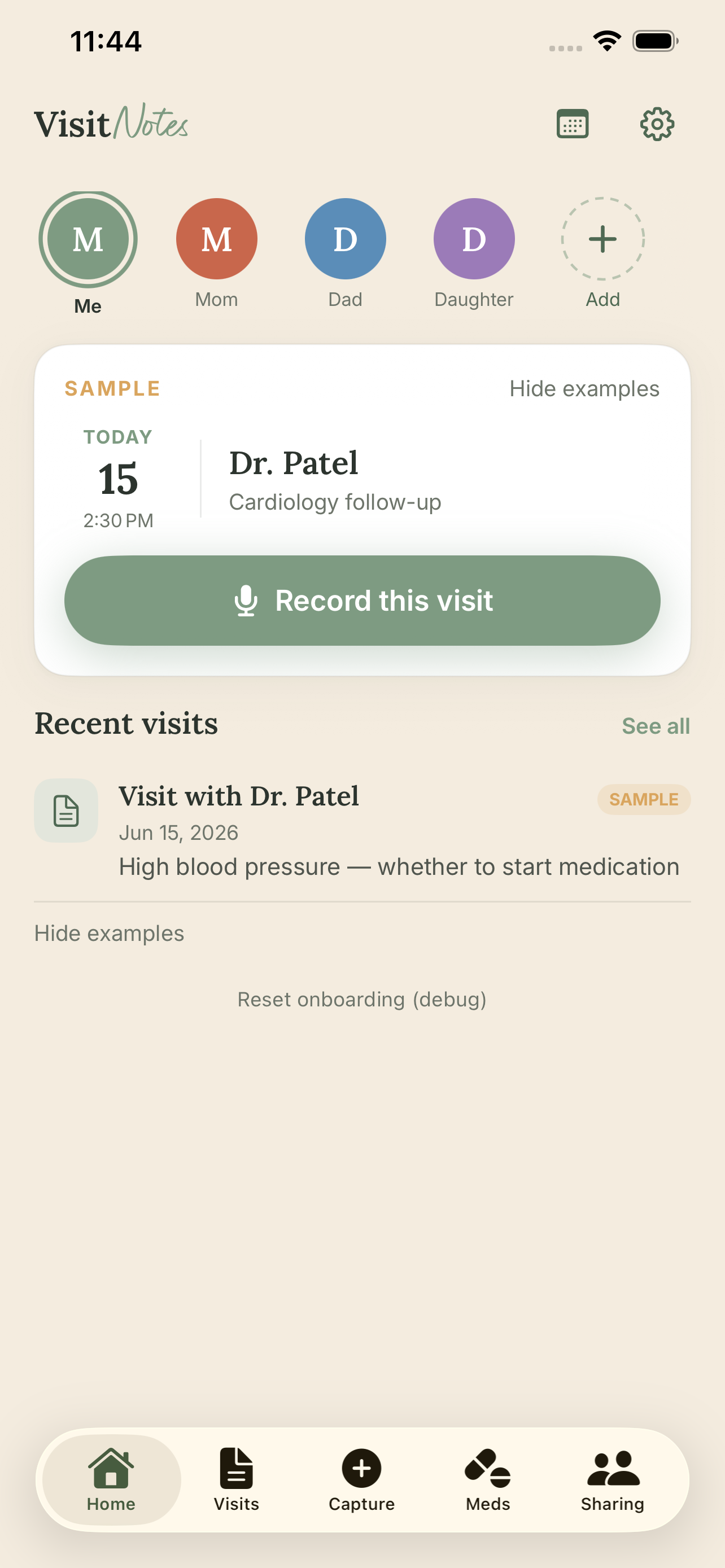
VisitNotes records and summarizes your medical visits in plain English — on your iPhone, in seconds.
Audio never leaves your phone.
"I finally understood what my doctor said."
Dad's cardiology appointment took an hour. When you asked how it went, you got two things: high blood pressure, and exercise more.
What didn't make it back to you: the plaque buildup. The recommendation for a second stent if things don't improve. Whether he's actually been taking the statin they prescribed three months ago. The dietary changes. The follow-up in four weeks.
He told you what little he understood.
VisitNotes closes the gap — for the person in the room, and the people waiting at home.
What real people say about trying to understand their doctor's visits.
"I just want an app that acts like a translator between Doctor and Human."
"Has anyone found a solution? We're having difficulty with our parents remembering what the doctor said."
"I nodded politely and pretended I understood. I had no idea what he just told me."
"I wasn't in the room and I'm relying on what he remembers."
"Something I can share with my siblings without having to explain everything myself."
"I wish someone would just walk me through it in plain English."
"By the time I find out something important, it's already been two weeks."
"I don't need a doctor right now. I need someone to explain what the doctor just said."
"The doctor explained my biopsy in two minutes and walked out. I sat there staring at the wall."
Open VisitNotes and tap Record before your visit starts. The app transcribes everything on your iPhone — no audio ever leaves your device. Or type notes, upload your after-visit summary, or snap a photo of your lab results.
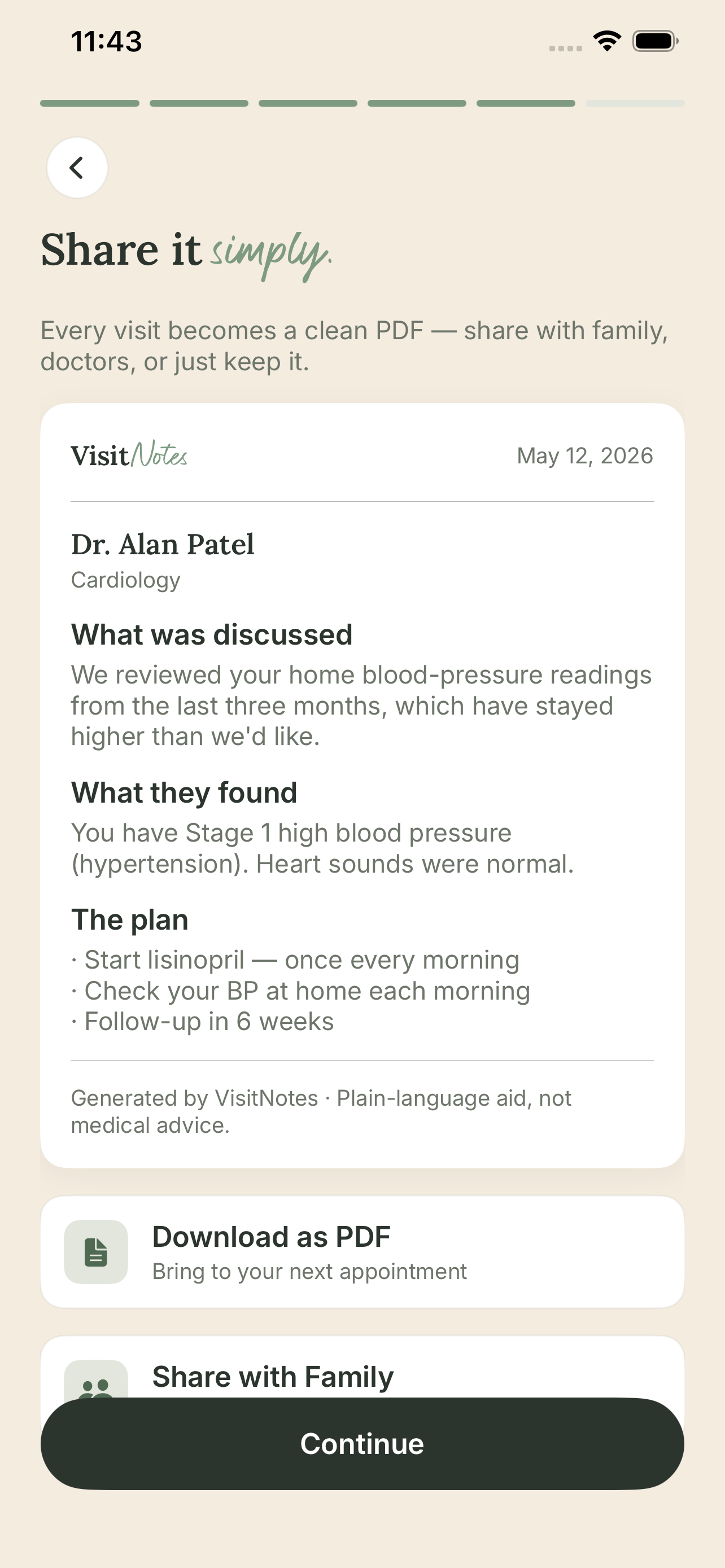
VisitNotes turns the transcript into plain English: what was discussed, what your medications are for, what the test results mean, and what to watch for. No medical jargon, no guessing.
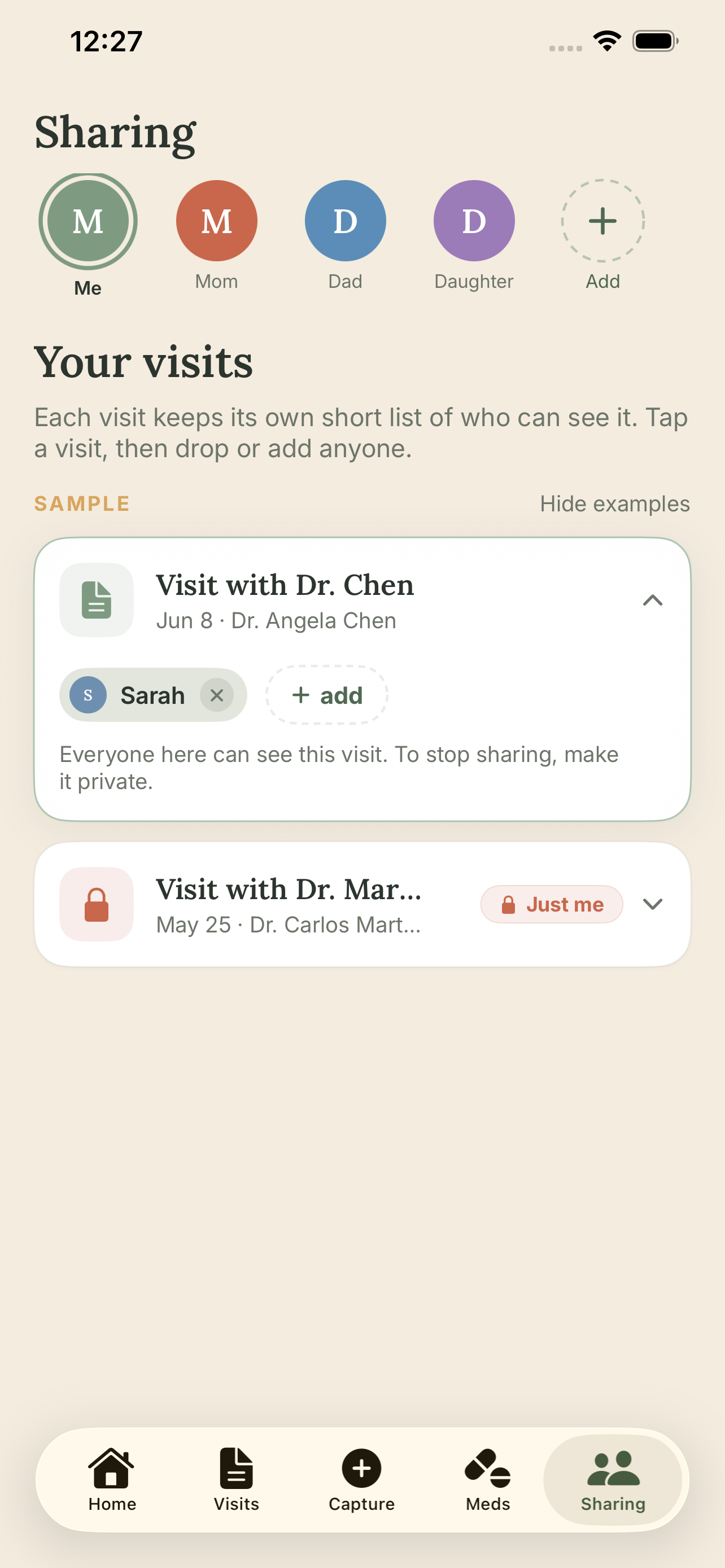
Send the summary to a spouse, adult child, or caregiver so everyone who matters stays in the loop — without you having to explain it all over again.
A clear, plain-English summary of every visit: what was discussed, what they found, and the plan — with medical terms explained at a human reading level, and clear signs of when to call the doctor.
Share a summary with a spouse, adult child, or sibling in one tap. No more phone tag trying to explain what happened. The people who care about you can read the same clear summary you have.
Your iPhone transcribes every visit on-device. The audio never leaves your phone — not to our servers, not anywhere. Only the text is used to write your summary, and it's never used to train AI or sold to anyone. Your visit isn't a data point — it's 100% yours.
Before your next visit, VisitNotes surfaces the right questions to ask based on your history — things you might forget under pressure. Arrive ready instead of scrambling.
You're often not just managing your own health — you're keeping track of a parent, a partner, a child. VisitNotes keeps each person's visits, medications, and appointments in one calm place.
As soon as a medication comes up in a visit, it's captured — current, clear, and ready to share. No more guessing what someone is taking.
Lisinopril 10mg New
One tablet every morning
Metformin 500mg
Twice daily, with meals
Atorvastatin 20mg
One tablet at night
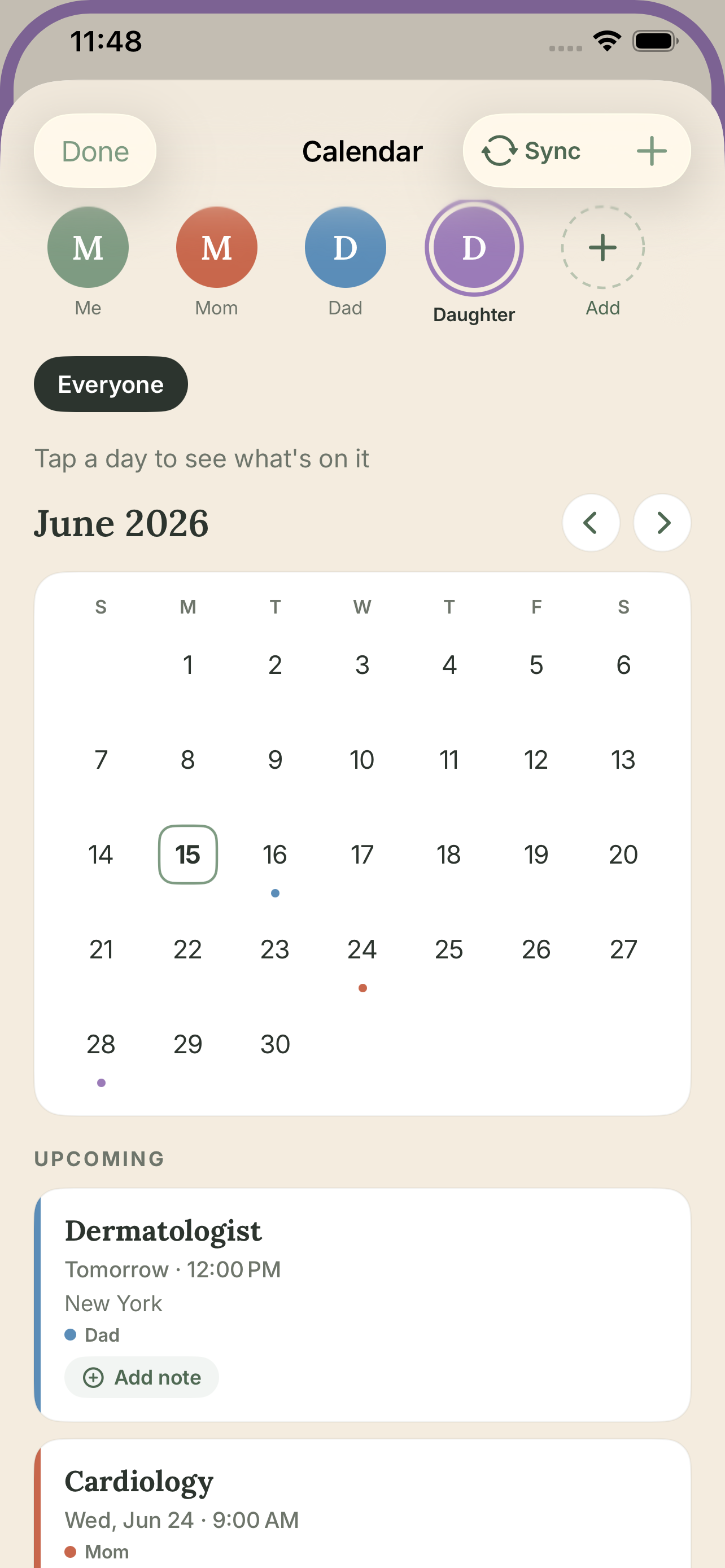
Sync everyone's appointments to one shared calendar, color-coded by person, so the whole family knows who's seen whom and what's coming up.
Dermatologist
Tomorrow · 12:00 PM
Cardiology
Wed, Jun 24 · 9:00 AM
When a parent ends up in the ER, the first question is often the hardest — what are they taking? With VisitNotes, the answer is already there.
When a health app is free, you are the product. Your diagnoses, your medications, the doctors they recommend — all of it is valuable to drug companies, insurers, and data brokers in intrusive ways most people never expect. Many apps are built on exactly that exchange.
VisitNotes isn't, and we don't want to be. Your audio never leaves your phone — so technically, there's nothing for us to share. But more than that: we believe your private health information belongs to you, permanently. We're here to help you understand and remember your visits. Nothing else. You can use the app without ever creating an account.
Download and use VisitNotes free — no credit card. Paid plans unlock sharing and more.
Get started with no commitment.
Everything you need for your own visits.
or $9.99 / month
Save $51 vs monthly
For the sibling network managing care together.
or $12.99 / month
Save $57 vs monthly
All plans start with a free download. Paid subscriptions are managed through Apple's App Store and can be cancelled anytime from your iPhone Settings.

Founder & Developer
I built VisitNotes after living this problem from both sides. Doctors are in and out in a few minutes, it's a lot to take in, and by the time you think of the right question you're already in the parking lot. Then someone at home asks how it went — and you realize you can't really explain it.
One moment stayed with me. A family member ended up in the ER, and the first question everyone asked was the simplest one: what medications are they on? Nobody knew. It was scribbled on a piece of paper somewhere. That isn't a memory failure — it's a system failure, and it's the kind of thing that should never be left to chance.
I've spent my career building systems to protect sensitive data. That taught me what "privacy-first" actually has to mean — not a marketing word, but a technical constraint. I designed VisitNotes so that I literally cannot access your audio even if I wanted to. Your recording stays on your phone. That isn't a feature. It's the whole point.
Built for the people I know — including myself.
Download VisitNotes FreeNo. Open VisitNotes and tap Record before your visit starts — that's it. You can also type notes, take a photo of your after-visit summary, or snap your lab results. Whatever works for you.
You're responsible for recording consent. We strongly recommend telling your provider before you start — most are supportive once they understand the purpose. Recording laws vary by state; some require all parties to consent before a conversation may be recorded.
Yes. Transcription happens entirely on your iPhone using Apple's built-in speech technology — audio never leaves your device. Only the text transcript is sent to generate your summary. Your data is never sold, never shared with advertisers, and never used to train AI models. We have a signed data processing agreement with our AI provider that prohibits it.
No. VisitNotes is not connected to your insurance provider, your employer's wellness program, or any electronic health record system. What you put in VisitNotes is between you and the people you choose to share it with.
The free plan includes 2 visit summaries per calendar month, 2 people profiles, and 30-minute recordings. Individual ($9.99/mo or $69/yr) and Family ($12.99/mo or $99/yr) plans unlock sharing, appointment prep questions, PDF export, longer recordings, and more.
On the Family plan, up to 5 adults can each record their own visits independently. Any member can share specific visit summaries with others in the care circle. You stay in full control of what's shared and with whom — no one can see another member's visits unless explicitly shared.
No. VisitNotes helps you remember and understand what your doctor actually said. It doesn't give clinical recommendations, diagnose conditions, or replace the relationship with your healthcare provider. If you think you're having a medical emergency, call 911.
VisitNotes is designed for people who don't want to think about technology. If you can send a text message, you can use it. No setup forms, no complicated menus — just open the app and tap Record.
Free to download. Audio stays on your phone. No credit card required.
Download VisitNotes FreeAvailable on the App Store · iPhone